
 ChatEND USER4 min read
Save a prompt to reuse it in one click
Saving a prompt lets you store an instruction you use regularly so you can find it in one click, without rewriting it. Available with or without a Copilot license, it's the habit that saves time and standardizes usage.
✅ How to
- 1The idea: your request templates
Saving a prompt lets you store an instruction you use regularly so you can find it in one click without rewriting it. The vivid image for a workshop: saved prompts are the equivalent of your personal templates, they let you capitalize on your best requests and reuse them endlessly. Good news, it's available with or without a Copilot license.
- 2Write and « run » your prompt
Start normally: type your prompt in Copilot and run it (for example « What are the most relevant use cases for my profile? »). It's from an actually used prompt that you'll be able to save it for next time.
- 3Click « Save prompt » when hovering over your prompt
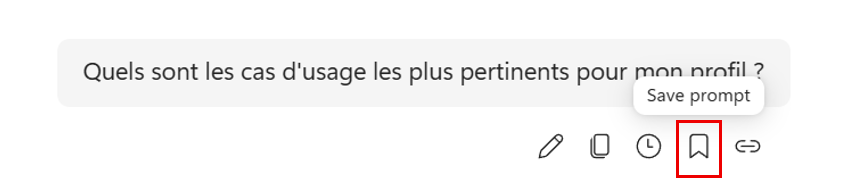
Hover over your prompt: a bar of icons appears just below it. Click the bookmark icon (« Save prompt »). That's the gesture that triggers the save.
- 4Save your prompt
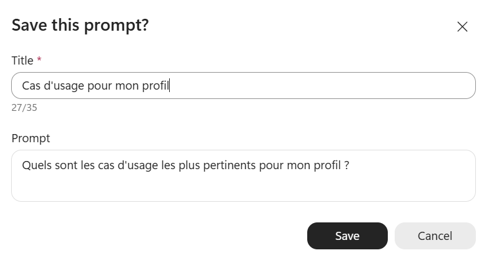
A « Save this prompt? » window opens. Give it a clear, meaningful title (e.g. « Use cases for my profile »), check the prompt text, then click « Save ». A good title is what will let you find it at a glance later.
- 5Access your prompts via the Prompt Lab
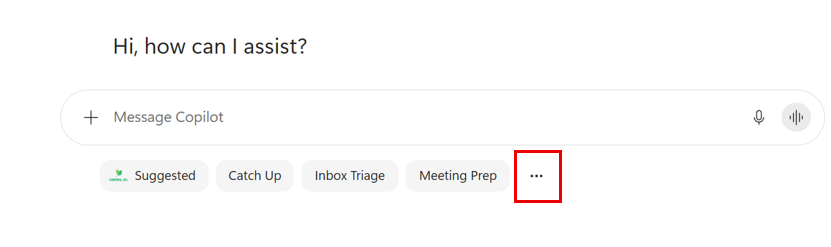
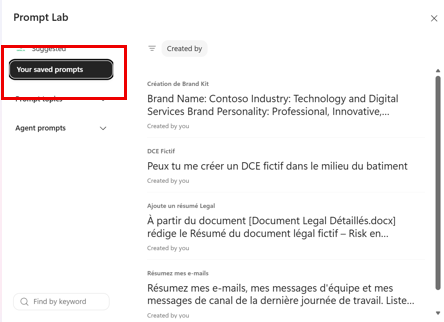
To find your prompts, look at the suggested prompts under the input box (« Suggested », « Catch Up », « Inbox Triage », « Meeting Prep »…) and click the « … » button on the right. The Prompt Lab opens: in the left column, select « Your saved prompts » to display all your saved prompts.
- 6Click the prompt to use
In « Your saved prompts », your saved instructions are listed with their title. One click on the one you want and it reloads directly, ready to run again. No need to rewrite it or remember the exact wording.
- 7Concrete examples
A few prompts worth saving once and for all:
- My daily summary of important emails.
- My standard meeting recap.
- My weekly priorities analysis.
- My help preparing an executive committee.
- My client recap generator.
- 8The business value
Instead of typing « Analyze the emails received today, identify the urgent ones, the client requests and propose a list of priorities. » every time, the user saves this prompt once and runs it whenever needed. The gain is immediate and repeats every day.
- 9What to remember
Four benefits to keep in mind:
- Time savings.
- Standardized usage.
- Possible sharing within a team depending on available features.
- Very useful to accelerate Copilot adoption.
⚡ Prompt to copy
Analyze the emails received today, identify the urgent ones, the client requests and propose a list of priorities.
💬 Comments
No comments yet. Be the first!
✨ Discover more
ChatOrganization prompts: structure and reuse your Copilot interactions
Available with and without a Copilot M365 license: publish prompts at the organization level to give your users ready-to-use, consistent and reusable starting points.
 Chat
ChatPlan your day in Outlook, without a Copilot license
With Copilot Chat (included, no license), reason across your whole inbox and build a to-do list aligned with the day's meetings.
PremiumSchedule a recurring prompt: your assistant that works ahead of you
What if Copilot prepared your day before you even opened your laptop? Scheduling a recurring prompt automatically runs an instruction at the frequency you choose (daily, weekly, monthly) and delivers the result, without you relaunching it.