
 PremiumEND USER4 min read
Schedule with Copilot: from an email thread to a structured meeting
Schedule with Copilot in Outlook automatically turns an email exchange into a meeting. Copilot analyzes the thread's context and helps create a meeting with the right people, a suitable time slot and a first draft agenda.
✅ How to
- 1The idea: the email that becomes a meeting
Schedule with Copilot in Outlook is a feature that automatically turns an email exchange into a meeting. To put it simply: Schedule with Copilot analyzes an email's context and helps create a meeting with the right people, a suitable time slot and a first draft agenda.
- 2Where to find it in Outlook
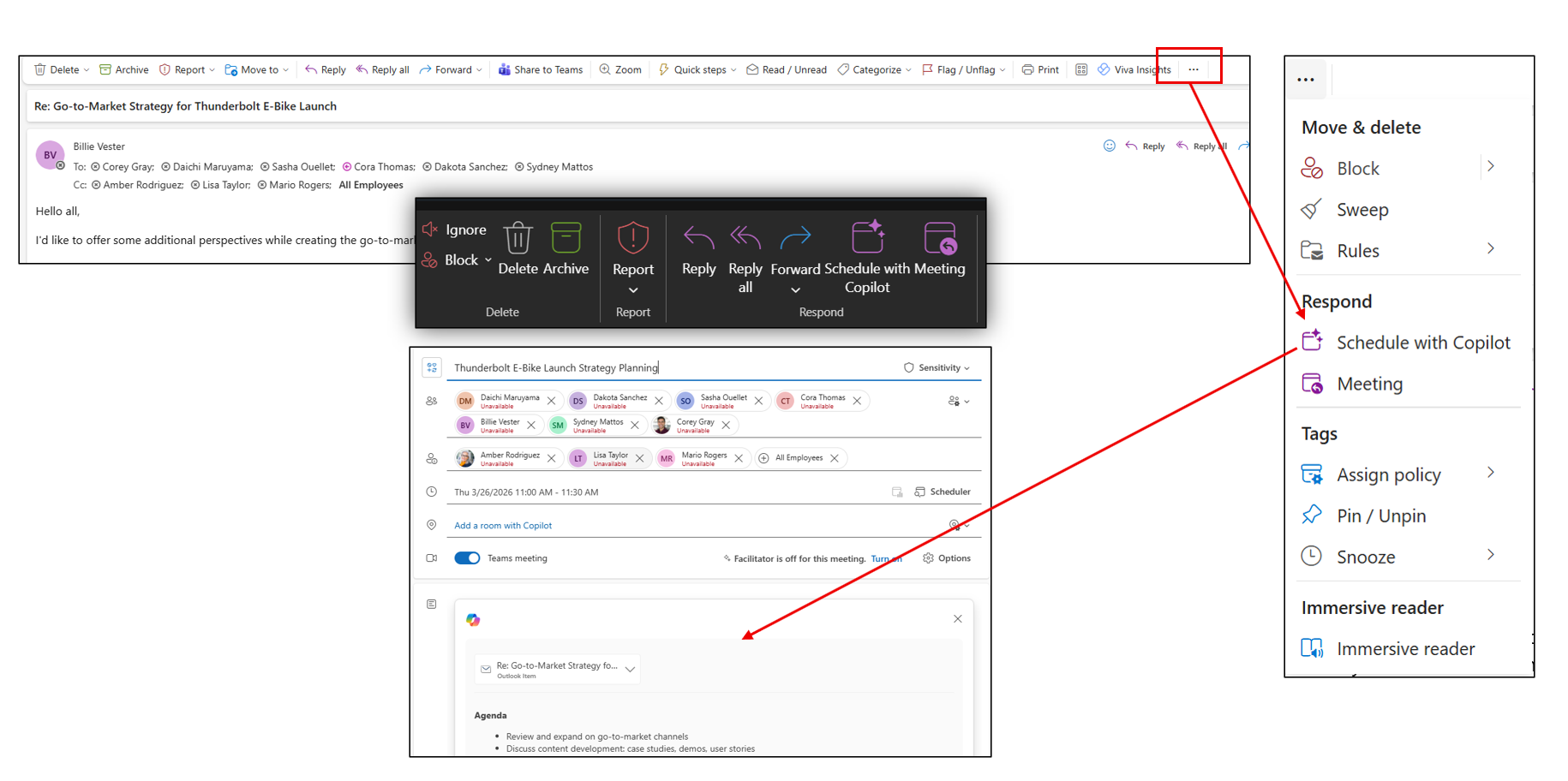
From an email, open the « … » menu (more actions) in the toolbar. Under the « Respond » section, click « Schedule with Copilot ». The option appears right at the message level: no need to copy anything, Copilot starts from the thread in front of you.
- 3What Copilot does
From the email thread, Copilot can:
- Identify the relevant participants.
- Propose a meeting title.
- Look for availability.
- Suggest a time slot.
- Generate an agenda based on the conversation.
- Create the Teams invite ready to send.
In the screenshot, you can see the result: the thread's participants are pulled in automatically, a title is proposed (« Thunderbolt E-Bike Launch Strategy Planning »), a slot is set, the Teams meeting is turned on and an agenda is generated from the topics discussed in the emails.
- 4Concrete use case
Imagine a 15-email exchange about a VINCI project. Instead of saying « We should have a meeting next week… » and chasing everyone, you click Schedule with Copilot. Copilot pulls the thread's participants, proposes a common slot, generates a Teams invite and creates an agenda from the topics raised in the emails. In a few clicks, the informal discussion becomes a framed meeting.
- 5What I'd keep in mind
The concrete benefits to remember:
- Fewer back-and-forths to find a date.
- Agenda generated automatically.
- Leverages the email thread's context.
- Speeds up meeting organization.
- Especially useful when an email exchange gets too long and needs a live discussion.
💬 Comments
No comments yet. Be the first!
✨ Discover more
PremiumOutlook's hidden duo: Agenda + Prepare
Copilot can help you shape a meeting when you create the invite, then bring together useful context before it starts. Discover Agenda, Prepare and the quick way to turn on Facilitator ahead of time.
PremiumSend an email straight from Copilot
Draft and send an email without leaving Copilot: describe the intent, let Copilot draft it, tweak the tone, send.
PremiumSummarize your inbox and reply to an email
Ask Copilot for a digest of your unread mail sorted by priority, then let it draft your replies right inside Outlook.