
 PremiumEND USERIT PRO6 min read
Use GPT models in Cowork without enabling Anthropic
Haven't enabled Anthropic for GDPR or governance reasons? Cowork remains fully usable with GPT models. Enable OpenAI as a Microsoft subprocessor to surface GPT 5.5 and GPT 5.6, then let users work with a GPT-centered configuration.
✅ How to
- 1Start here: Cowork is GA, models have their own status
Copilot Cowork is generally available. That does not mean every model shown in the picker is itself GA.
In the current public documentation, GPT 5.5 is shown as « GPT 5.5 (Frontier) ». GPT 5.6 Sol, GPT 5.6 Terra and GPT 6 Astra are listed separately, without the Frontier label.
- 2What users see in Cowork
The picker defaults to « Auto ». Cowork then chooses a model from those allowed by the organization. If Anthropic isn't enabled, Cowork continues to work with the GPT models authorized by the organization.
Expand « GPT » to see the available models. The selected model remains saved on the device until the user changes it.
- 3GPT 5.5, GPT 5.6 and GPT 6 Astra for organizations requiring EUDB
GPT 5.5 (Frontier) is listed as hosted in Azure AI Foundry. GPT 5.6 Sol, GPT 5.6 Terra and GPT 6 Astra are provided by OpenAI as a Microsoft subprocessor, without the Frontier label: only GPT 5.5 carries it today.
Microsoft documentation states that OpenAI-operated models, Astra included, are included in the EU Data Boundary, except for documented exclusions. This is the path to assess when offering these models in Cowork while meeting an organization's EUDB requirements.
- 4Enable OpenAI in the admin center
The exact path is: Microsoft 365 admin center›Copilot›Settings›View all›AI providers operating as Microsoft subprocessors.
Select « OpenAI » under « Available subprocessors for your organization », choose « All users » or specific users and groups, then select « Save ». You need the AI Administrator or Global Administrator role. Additional controls for Copilot Studio and Power Platform are available in the Power Platform admin center.
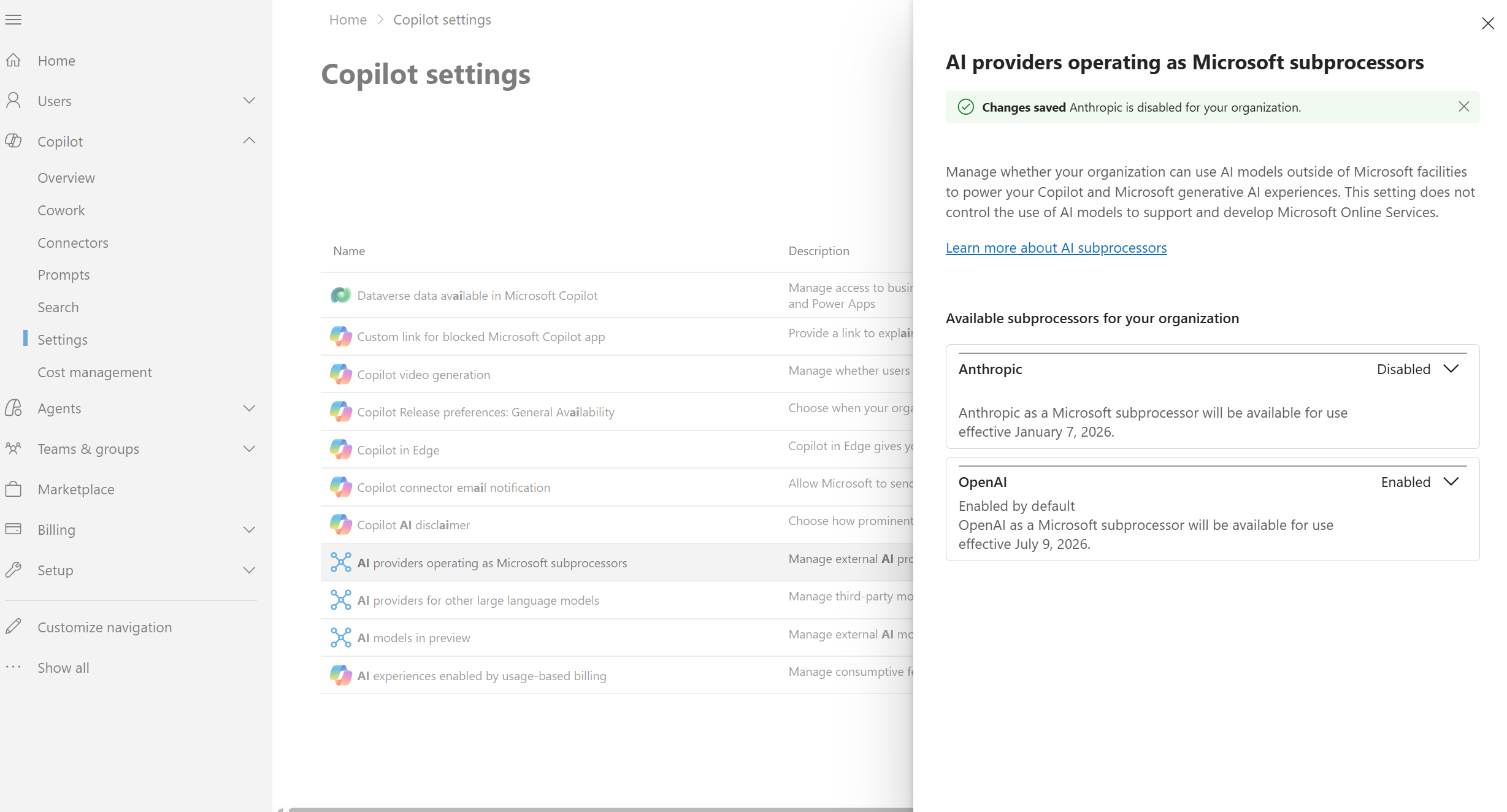
Anthropic is disabled while OpenAI is enabled as a Microsoft subprocessor: Cowork can therefore continue offering GPT models.
- 5Verify the result in Cowork
After the setting propagates, open Cowork and select « Auto ». Expand « GPT »: the models available to your organization should appear, including GPT 6 Astra. You can then select GPT 5.5, GPT 5.6 or GPT 6 Astra for the task, or return to « Auto » and let Cowork choose.
If the models do not appear, check the admin role, user or group assignments, licensing and propagation time. Enabling the provider does not replace access authorization for Cowork.
As shown in the screenshot below, once Anthropic is disabled, Cowork keeps working normally: only GPT models show up in the picker, and your organization stays within the EU Data Boundary since these models are included in it.
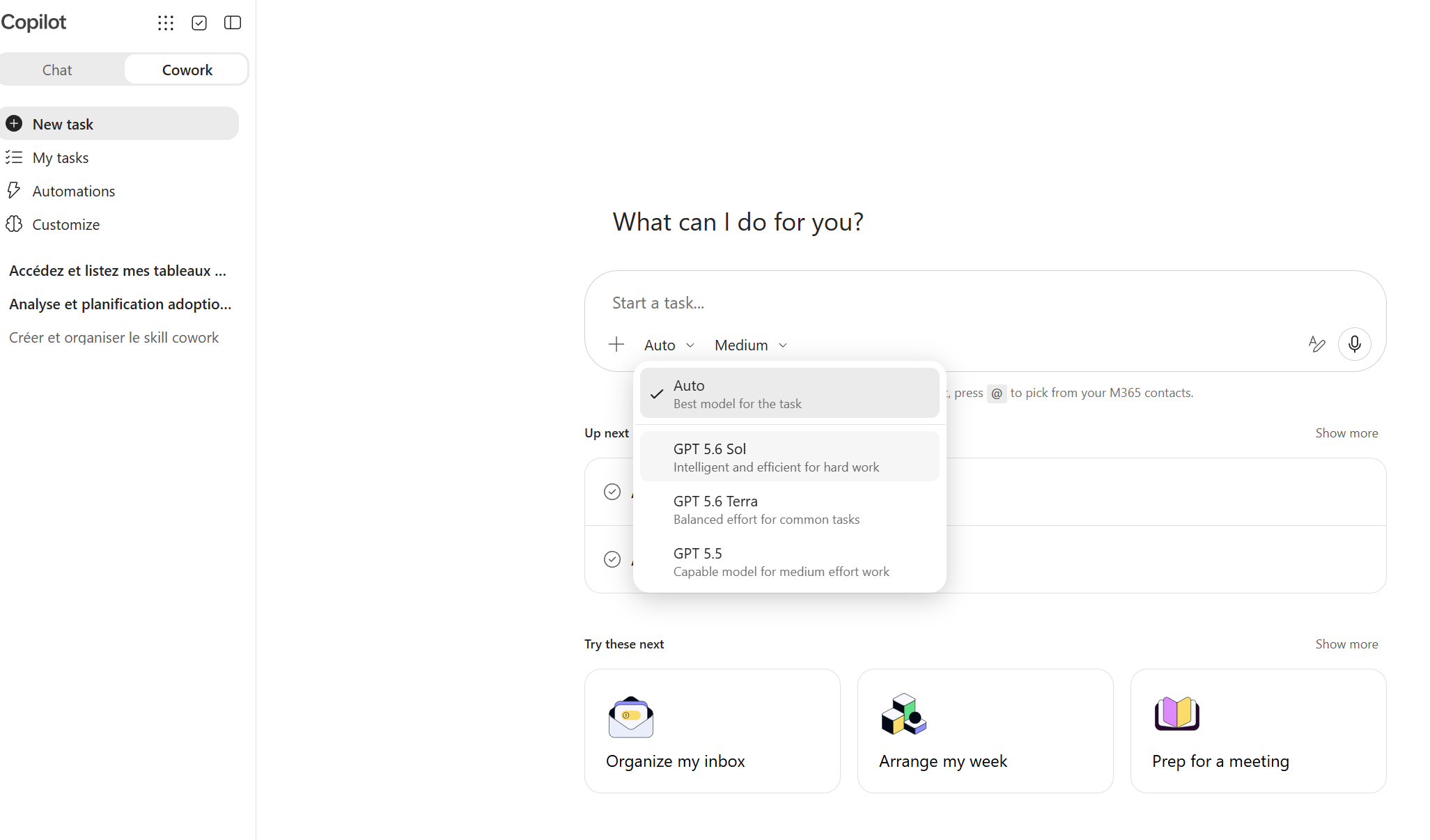
Cowork's model picker now shows only the GPT family (GPT 5.6 Sol, GPT 5.6 Terra, GPT 5.5): proof that Cowork works perfectly well with OpenAI alone, in line with the EU Data Boundary.
- 6Anthropic can remain disabled
If your organization hasn't approved Anthropic processing, you don't need to enable it to use Cowork. Anthropic is a separate provider with its own processing scope. Leaving it disabled simply limits model choice to the providers authorized by your tenant, including GPT.
Organizations without GDPR or EUDB constraints can assess Anthropic separately, after their legal and governance review.
- 7The GPT-only scenario in practice
- Disable Anthropic, or leave it disabled, when required by your GDPR policy.
- Enable OpenAI as a Microsoft subprocessor in the admin center.
- Grant access to the relevant users or groups.
- Use « Auto » or explicitly select GPT 5.5 / GPT 5.6 in Cowork.
This configuration lets you deploy Cowork without opening access to the Anthropic family.
- 8What to remember
Cowork remains fully usable with GPT models when Anthropic isn't enabled. GPT 5.5 is publicly labeled Frontier, while GPT 5.6 and GPT 6 Astra are provided by OpenAI as a Microsoft subprocessor without that label. For a scenario subject to GDPR or EUDB requirements, document the authorized providers and keep a GPT-only configuration aligned with your policy.
Documentation note: the public Cowork models page lists GPT 5.5 as « Frontier ». Cowork can be GA without every available model carrying the same availability status. Status as of September 17, 2026, subject to change.
📚 Official sources
💬 Comments
No comments yet. Be the first!
✨ Discover more
PremiumGPT-6 Astra in Cowork and Copilot Studio: delegate more complex work
GPT-6 Astra brings clearer understanding to complex work you delegate to Copilot. Discover its strengths, how it is grounded in your work context, and its current availability, limited to Copilot Cowork and Copilot Studio.
PremiumCowork: setting up the billing policy and Cost Management
Before launching Cowork, IT has to set up a billing policy: without it, nothing runs. Let's see where it lives (Cost Management), how an Azure subscription works, the difference between PAYGO and Capacity Packs, and above all how to activate the policy and set monthly and per-user limits to keep the budget under control.
PremiumCowork: understanding value consumed, not price
Cowork isn't reasoned about like one more license, but like value consumed: you pay for the work actually done. Let's look at the four-building-block framework, how to classify missions (Light, Medium, Heavy) to size a budget, why pay-as-you-go is interesting, and how to spot your best use cases.