
 PremiumEND USERIT PRO5 min read
GPT-6 Astra in Cowork and Copilot Studio: delegate more complex work
GPT-6 Astra brings clearer understanding to complex work you delegate to Copilot. Discover its strengths, how it is grounded in your work context, and its current availability, limited to Copilot Cowork and Copilot Studio.
✅ How to
- 1GPT-6 Astra in a nutshell
GPT-6 Astra is OpenAI's newest model integrated into Copilot; it expands the kind of work Copilot can take on. Unlike GPT 5.5, GPT-6 Astra is not labeled « Frontier » in the model picker: it is listed as provided by OpenAI as a Microsoft subprocessor, just like GPT 5.6.
Instead of always breaking a task into small steps and guiding Copilot at every moment, you can delegate a larger task, then spend your time reviewing the result, making a decision and moving the work forward. Its main strength is broad understanding: Astra can reason over a more complete request and help turn an objective into a usable result. It does not replace human validation, but shifts the effort toward review and decision-making.
- 2Why Astra makes understanding clearer
When a request has several constraints, the challenge is keeping information, priorities and the expected outcome aligned. Astra is designed to take more of that context into account so it can produce a more relevant and accurate response.
Quality still depends on the instruction, the data available and user validation. State the objective, expected output, constraints and sources to use; then let Astra work across the whole request instead of giving it only a sequence of isolated commands.
- 3The role of Work IQ
In Copilot Cowork, Work IQ grounds GPT-6 Astra in the files, meetings, chats and business data the user already has permission to access. The model can therefore reason over a real work context while respecting existing permissions.
This is valuable for summaries, action plans and work that requires connecting several sources. The model does not grant additional access: it uses data that is already authorized for the user.
- 4Astra in Copilot Cowork
In Cowork, GPT-6 Astra appears in the model picker under the GPT family. The user can select it for a complex task, or leave « Auto » to choose the most suitable model allowed by the organization.
Example use cases include bringing together project information, surfacing decisions from several meetings, preparing a first summary or structuring an action plan from documents and conversations. Always review the result before sharing it or turning it into an action.
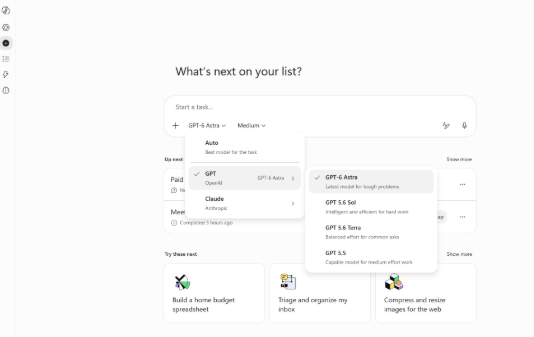
GPT-6 Astra selected in the Copilot Cowork model picker.
- 5Astra in Copilot Studio
In Copilot Studio, GPT-6 Astra can be selected as the agent's model. It is a good fit when an agent must understand a rich request, use its knowledge and produce a structured answer rather than a short response.
As you can see in the screenshot below, GPT-6 Astra is available in the model settings. You can then test your agent with a real use case, review its answers and adjust its knowledge or actions until you get the result you expect.
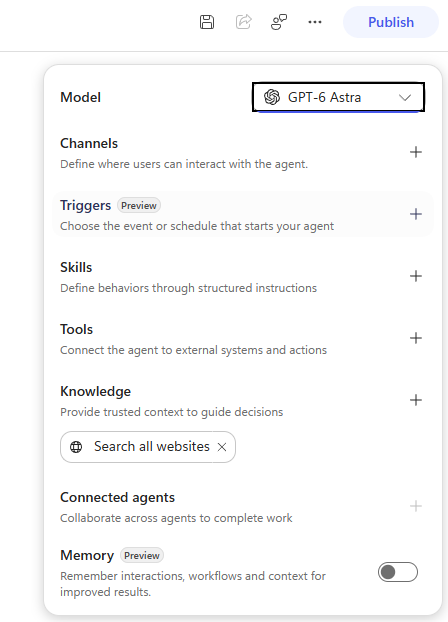
GPT-6 Astra selected as an agent model in Copilot Studio.
- 6Current availability
GPT-6 Astra is available in Copilot Cowork and Copilot Studio.
Time Spent On Decisions: Users focus their time on reviewing results, making decisions, and moving work forward.
Availability to remember: Microsoft's announcement currently covers Copilot Cowork and Copilot Studio. Rollout may vary by region and organization; check the latest release information. Status as of September 17, 2026, subject to change.
📚 Official sources
💬 Comments
No comments yet. Be the first!
✨ Discover more
PremiumUse GPT models in Cowork without enabling Anthropic
Haven't enabled Anthropic for GDPR or governance reasons? Cowork remains fully usable with GPT models. Enable OpenAI as a Microsoft subprocessor to surface GPT 5.5 and GPT 5.6, then let users work with a GPT-centered configuration.
PremiumCowork: setting up the billing policy and Cost Management
Before launching Cowork, IT has to set up a billing policy: without it, nothing runs. Let's see where it lives (Cost Management), how an Azure subscription works, the difference between PAYGO and Capacity Packs, and above all how to activate the policy and set monthly and per-user limits to keep the budget under control.
PremiumThe Frontier program: early access to Microsoft Copilot
Frontier is your door to the next Copilot features, ahead of everyone else. Here's a clear rundown of this early-access program: what it is, who it's for, how IT turns it on (with screenshots), how to spot a Frontier feature with real examples, its benefits and its caveats.