
 PremiumEND USERIT PRO7 min read
Cowork: understanding value consumed, not price
Cowork isn't reasoned about like one more license, but like value consumed: you pay for the work actually done. Let's look at the four-building-block framework, how to classify missions (Light, Medium, Heavy) to size a budget, why pay-as-you-go is interesting, and how to spot your best use cases.
✅ How to
- 1Shift your view: value consumed, not price
The right question for Cowork isn't « how much does it cost? » but « what value am I consuming? ». Usage-based billing aligns cost to the work actually being done.
In other words: you're not paying an average flat fee for everyone, you're paying for value created, when it's created.
- 2The four-building-block framework
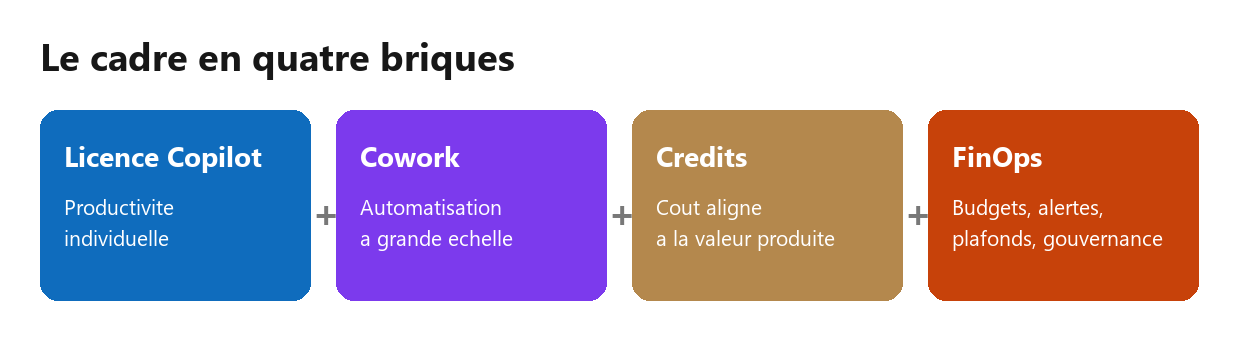
To place each element without getting lost:
- Copilot license: individual productivity, in your everyday apps.
- Cowork: automation of multi-step tasks, at a larger scale.
- Credits: cost, aligned to the value produced (pay-as-you-go).
- FinOps: steering (budgets, alerts, caps, governance).
Each block has its role; together they frame adoption cleanly.
- 3How it works: pay-as-you-go
Cowork asks two things of the organization: an active Microsoft Copilot license, and usage-based billing enabled by IT. That second point unlocks task execution.
The official model is called pay-as-you-go (PAYGO). Usage is measured in Copilot Credits. The real cost depends on the work actually done: the model used, the volume of context, tool calls and orchestration. No need to aim for the exact cent.
- 4Classify missions: Light, Medium, Heavy
Rather than guessing an exact cost, classify each mission into three levels to get an order of magnitude. It's the simplest way to size a spend.
- Light: a short, targeted task.
- Medium: a multi-source analysis or synthesis.
- Heavy: a full deliverable on large volumes.
The table below gives illustrative orders of magnitude (to be adjusted to real complexity and your commercial terms).
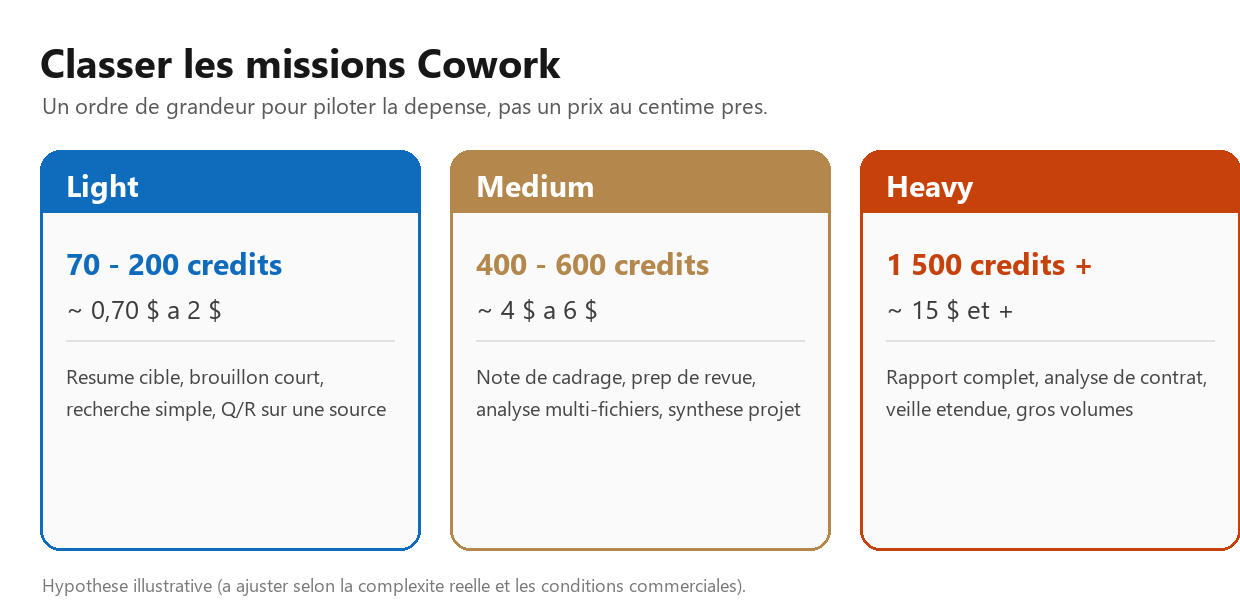
Level Credits (order of magnitude) Indicative cost Examples Light 70 to 200 ~ $0.70 to $2 Targeted summary, short draft, simple search Medium 400 to 600 ~ $4 to $6 Scoping note, review prep, multi-file analysis Heavy 1,500 and more ~ $15 and more Full report, contract analysis, extended watch - 5Build your pilot budget
A simple five-step method:
- Identify your use cases.
- Classify them Light, Medium or Heavy.
- Estimate their monthly frequency.
- Multiply to get a monthly envelope.
- Use that envelope to launch a pilot.
Illustrative example: a steering-committee prep (Medium, 4 times a month), a regulatory watch (Light, 20 times a month) and an RFP response (Heavy, 2 times a month) give a first envelope of around $90 a month. Adjust with your own numbers.
- 6Talk value, not cost
The real topic isn't the amount, but the business value created. The right question: how much does this activity cost today in human time, delay and quality risk?
Then compare the cost of one Cowork run with a task that mobilizes several people for several hours. A monthly review, a complex file analysis or a recurring watch quickly tip to the gain side: time saved, better quality, consistency, faster decisions.
- 7FinOps: stay in control
Pay-as-you-go doesn't mean losing control. On governance, IT has official levers:
- A billing policy linking usage to an Azure subscription.
- Budgets with email alerts (careful: they notify but don't automatically block).
- Per-agent consumption caps and usage monitoring.
- Cost visibility in Microsoft Cost Management (Azure), with per-team breakdown.
The right reflex: start small, set caps, monitor, then scale on the higher-value cases.
- 8Find your use cases
Value comes from the right use cases. To spot them in your context:
- Start from your role: which repetitive, multi-step tasks eat your time each week?
- Look for time-consuming, low-value missions (consolidation, formatting, follow-ups, recurring reporting).
- Estimate the value produced (time saved, consistency, quality) before the cost.
- Test on a small scope, measure, then scale what proves its value.
- 9What to remember
Cowork is reasoned about in value consumed: you pay for work done, not an average. The license / Cowork / credits / FinOps framework helps you decide, and the Light / Medium / Heavy classification helps size a budget.
Start small, measure, govern, and let the use cases that prove their value guide the scale.
Cowork requires a Microsoft Copilot license AND usage-based billing enabled by IT. The Light / Medium / Heavy levels and their costs are illustrative orders of magnitude to size a budget, not an official Microsoft price list. Use the official estimator and check with your IT and commercial terms.
📚 Official sources
💬 Comments
No comments yet. Be the first!
✨ Discover more
PremiumCowork: setting up the billing policy and Cost Management
Before launching Cowork, IT has to set up a billing policy: without it, nothing runs. Let's see where it lives (Cost Management), how an Azure subscription works, the difference between PAYGO and Capacity Packs, and above all how to activate the policy and set monthly and per-user limits to keep the budget under control.
PremiumCowork in practice: a multi-task prompt and tracking credits with /cost
You know Cowork, now let's see it in action. An example prompt that chains several tasks at once, the right reflex to choose between Cowork and classic Copilot, and the /cost command to see how many credits your request used.
PremiumAutomate your Copilot watch: a monthly « What's New » generated and sent by Cowork
Cowork's real superpower is running a recurring mission for you. Here's a ready-to-schedule prompt that, every month, reads the « What's New in Microsoft Copilot » article on the Microsoft Community Hub, produces a structured summary, then emails it in a branded layout and posts it to your Teams channels.