
 ChatEND USER5 min read
Run a Deep Research investigation
On a complex topic, let Copilot “think” longer: pick the right reasoning mode (Quick response vs Think deeper) to get a sourced, actionable synthesis.
✅ How to
- 1
What is deep research?
It's not a simple Q&A: you ask Copilot to explore a topic from several angles, cross-check sources, compare options and return a structured synthesis (context, facts, assumptions, recommendation). Great for a decision, a benchmark, a scoping note or market watch.
- 2
Choosing reasoning power: the mode selector.
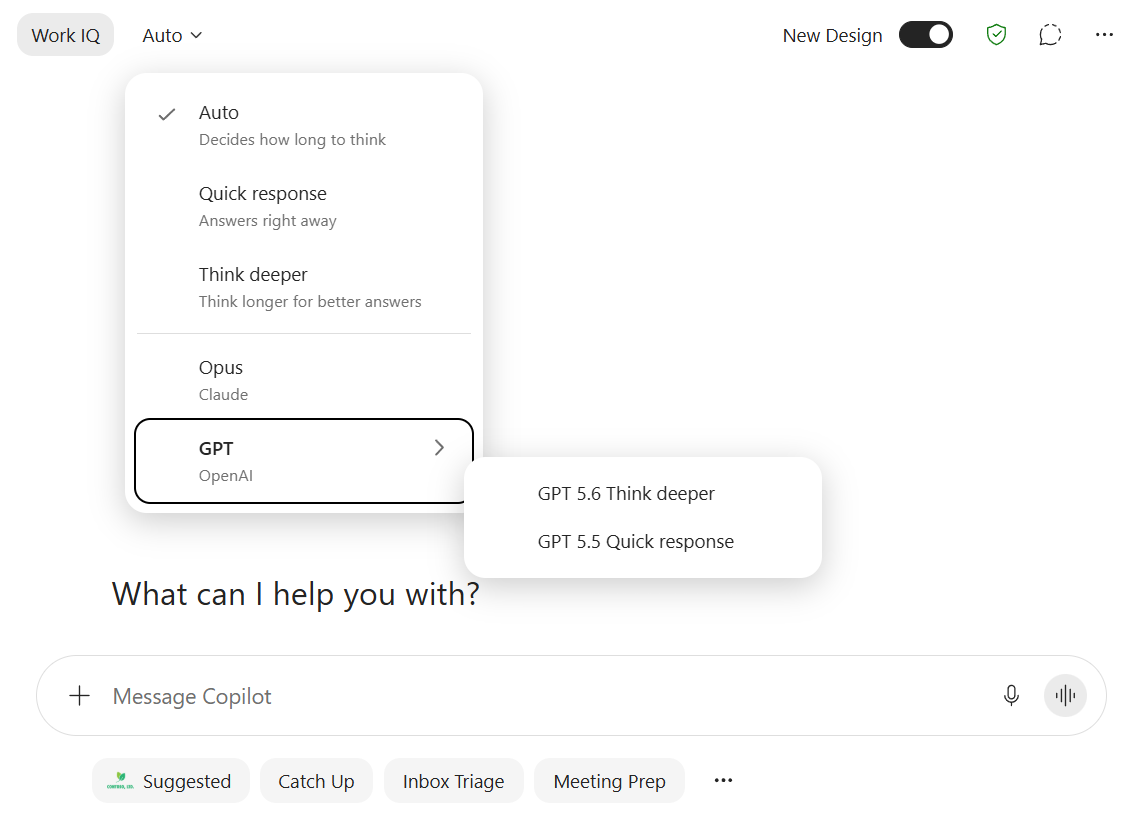
In the top-left of Copilot Chat, a selector (“Auto” by default) decides how long Copilot “thinks” before answering. This setting is what separates an instant reply from a genuine in-depth analysis.
- 3
Understand the 3 modes:
- Auto: Copilot decides how long to think based on the question. The sensible everyday default.
- Quick response (GPT-5.5): answers right away, with no long reasoning step. Built for speed.
- Think deeper (GPT-5.6): Copilot thinks longer to build a structured, more reliable line of reasoning. Built for quality on complex topics.
- 4
Which mode for which request?
- Use Quick response for: a factual question, a definition, a rewrite, a short email, quick brainstorming, when speed matters and stakes are low.
- Use Think deeper (or Auto) for: analysis, multi-criteria comparison, strategy, synthesis across several sources, multi-step reasoning, when quality matters and a few seconds' wait is fine.
Simple rule: low stakes + need speed → Quick response; high stakes + need reliability → Think deeper.
- 5
Launch the deep research.
Select Think deeper (via GPT ➞ “GPT 5.6 Think deeper”), then state a precise question AND the expected deliverable (brief, comparison table, reasoned recommendation).
- 6
Set the quality bar: ask Copilot to cite its sources and clearly separate facts from assumptions.
- 7
Iterate to dig deeper: “Go deeper on point 2”, “Compare the 3 options in a table”, “What are the risks and blind spots?”.
⚡ Prompt to copy
Run a deep research on [topic] (Think deeper mode). Deliverable: structured brief with context, 3 compared options (table), risks, and a reasoned recommendation. Cite your sources and separate facts from assumptions.
💬 Comments
No comments yet. Be the first!
✨ Discover more
ChatGPT-5.6 arrives in Microsoft Copilot
GPT-5.6 becomes Copilot's default model: stronger reasoning, native Work IQ integration and better quality in Word, Excel and PowerPoint. Here's where to select it and what actually changes.
 Premium
Edit with Copilot in Word: rewrite and enrich a document
A document that's almost done, but the tone is off, the text is too long, or content is still missing. With Edit with Copilot and « Allow Editing », you ask Copilot to rewrite directly inside Word, and even pull material from another source: an email, a PDF, another document.
 Chat
ChatSchedule a meeting using Copilot
No more back-and-forth to find a slot. From the Copilot app, simply ask in natural language to schedule a Teams meeting: Copilot checks calendars, suggests slots where everyone is free, and prepares the invite. All you have to do is click « Send ».