
 ChatEND USERIT PRO3 min read
GPT-5.6 arrives in Microsoft Copilot
GPT-5.6 becomes Copilot's default model: stronger reasoning, native Work IQ integration and better quality in Word, Excel and PowerPoint. Here's where to select it and what actually changes.
✅ How to
- 1
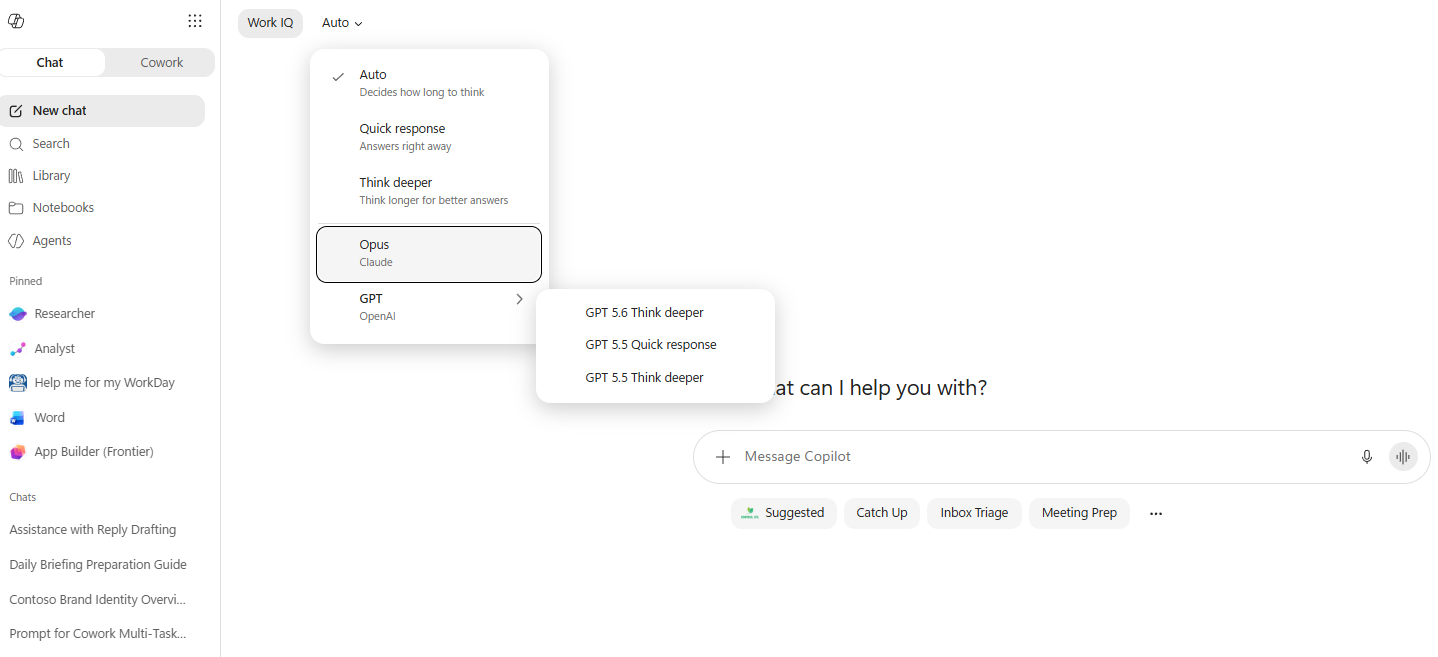
Where do you pick the model? In Copilot Chat, at the top of the conversation, click the mode selector (next to “Work IQ”). This is where you switch between reasoning modes and models.
- 2
What's available today:
- Auto: Copilot decides how long to think (and the best-fit model).
- Quick response: answers right away.
- Think deeper: thinks longer for better answers.
- Opus : Claude (Anthropic).
- GPT (OpenAI) → GPT 5.6 Think deeper, GPT 5.5 Quick response, GPT 5.5 Think deeper.
- 3
✨ What actually changes:
- GPT-5.6 replaces GPT-5.5 as the default model in Copilot Chat.
- Stronger reasoning, especially for agentic tasks and multi-step workflows: Copilot handles more complex scenarios more efficiently.
- Native Work IQ integration: combines the model's reasoning with your organization's work data.
- The result: a tangible improvement in everyday work quality in Word, Excel and PowerPoint.
- 4
💻 Across the apps:
- Copilot Cowork: runs tasks more efficiently and produces more complete, directly actionable results.
- Excel: analyzes more complex problems and turns a request into a result faster, with less manual work.
- Word: helps turn ideas into more complete, better-structured and smoother documents, while improving writing quality.
- PowerPoint: generates richer presentations, with higher-quality content, better visual balance and more flexibility in styles.
- 5
📅 Availability:
- GPT-5.6 is currently rolling out across all Microsoft Copilot apps.
- Copilot will automatically use GPT-5.6 when it's the best-fit model for the task, becoming the default model.
⚡ Prompt to copy
Switch to GPT-5.6 (Think deeper), then: from [document / data], propose a 5-step action plan with, for each step, the risks, dependencies and expected deliverable.
💬 Comments
No comments yet. Be the first!
✨ Discover more
 Chat
ChatTalk to Copilot: voice conversation on mobile
What if you talked to Copilot like a real personal assistant? Voice conversation, grounded in your work data and the web, makes your exchanges simpler, faster and more natural. Here's how to start it, how to dialogue well, and 4 concrete scenarios to get going.
ChatSave a prompt to reuse it in one click
Saving a prompt lets you store an instruction you use regularly so you can find it in one click, without rewriting it. Available with or without a Copilot license, it's the habit that saves time and standardizes usage.
ChatWhere can you access Copilot? All the entry points
« But where do I actually find Copilot? » That's THE question that keeps coming back. Good news: there isn't one single place, but many. Here are all the entry points, from web to mobile, through Edge, Teams, the dedicated app and of course your Microsoft 365 apps.