
 ChatEND USER4 min read
Schedule a meeting using Copilot
No more back-and-forth to find a slot. From the Copilot app, simply ask in natural language to schedule a Teams meeting: Copilot checks calendars, suggests slots where everyone is free, and prepares the invite. All you have to do is click « Send ».
✅ How to
- 1Ask, in natural language
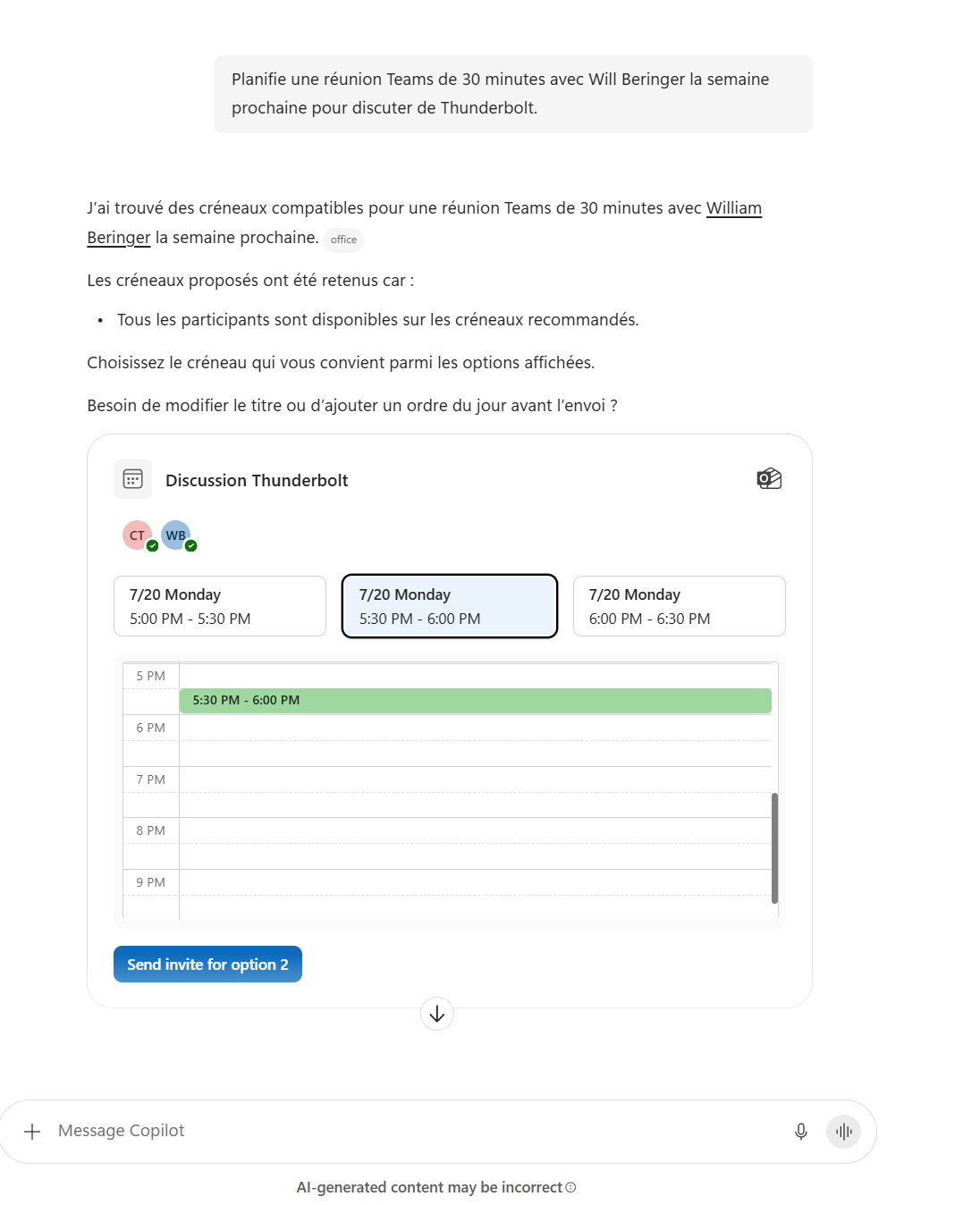
In the Copilot app, just phrase your need as you would to an assistant. For example: « Schedule a 30-minute Teams meeting with Will Beringer next week to discuss Thunderbolt. »
No form, no menu to browse: you describe the meeting (duration, attendees, topic, timeframe), and Copilot handles the rest.
- 2Copilot compares calendars
Copilot checks the attendees' calendars and looks for times when everyone is free. It replies while explaining its choice: « I found compatible slots... the proposed slots were selected because all attendees are available. »
In other words, you no longer suggest a random time: you start straight from real availability.
- 3Pick the right slot
Copilot displays several slot options, with a day preview to see where the meeting would land. You just select the one that suits you best among the suggestions.
Need to adjust? You can still change the title or add an agenda before sending, still in natural language.
- 4Send the invite
Once the slot is chosen, a simple click on « Send invite » generates and sends the Teams invitation to the attendees. The meeting is created, the Teams link is included, and everyone gets their invite.
From request to sent invite: a few seconds, without leaving the conversation.
- 5What to remember
Scheduling a meeting with Copilot means delegating the painful part: finding a common slot. You describe the meeting in one sentence, Copilot cross-references calendars, suggests the best times, and you confirm in one click. Perfect for quick everyday meetings, without opening your calendar or juggling everyone's availability.
💬 Comments
No comments yet. Be the first!
✨ Discover more
PremiumFacilitator: the agent that takes notes in your Teams meetings for you
Facilitator is a Copilot agent that sits in your Teams meetings like an extra teammate: it takes notes in real time, tracks the agenda, keeps up with decisions and tasks, and answers questions in the meeting chat. Let's see how to turn it on (two ways), what it does, and the nuance not to confuse with plain automatic transcription.
ChatCopilot in Teams: pin it and drive it without leaving your everyday tool
Did you know you can use Copilot right inside Teams, the app you already keep open all day? Let's see where to find it in the left rail, how to pin it yourself if IT hasn't, what you can do with it (chat and agents), and its current limits.
PremiumMeeting Recaps: all your meeting summaries in one place
An often-overlooked Teams app that brings together all your meetings, past and upcoming, each with an intelligent recap. No more digging through chats or emails to find a summary: everything is centralized, and you can even listen to an audio recap.