
 PremiumEND USERIT PRO5 min read
Skills in declarative agents: capabilities on demand
Skills add reusable capabilities to declarative agents. Learn how to add them, how an agent combines them to handle an Outlook request, and which safeguards remain in place.
✅ How to
- 1A Skill is a reusable capability
A Skill bundles instructions, scripts, templates and resources to help a declarative agent carry out a specific task. The same Skill can be reused across agents. It loads when the agent needs it, rather than adding every instruction to the agent all the time.
Important: the agent's behavior does not change until its creator adds Skills.
- 2Add or create Skills
In Agent Builder, open the agent, select « Configure », then go to « Skills ». Select « Add » to attach one or more Skills that fit the agent's role. You can also describe the capability you want to create in natural language in the chat. The conversation helps clarify its purpose and expected tasks. You can then open the Skill to review its instructions and resources, and refine them before adding it to the agent.
A Skill complements the agent's instructions; it does not replace them. For a step-by-step guide to creating an agent, see our Agent Builder article.
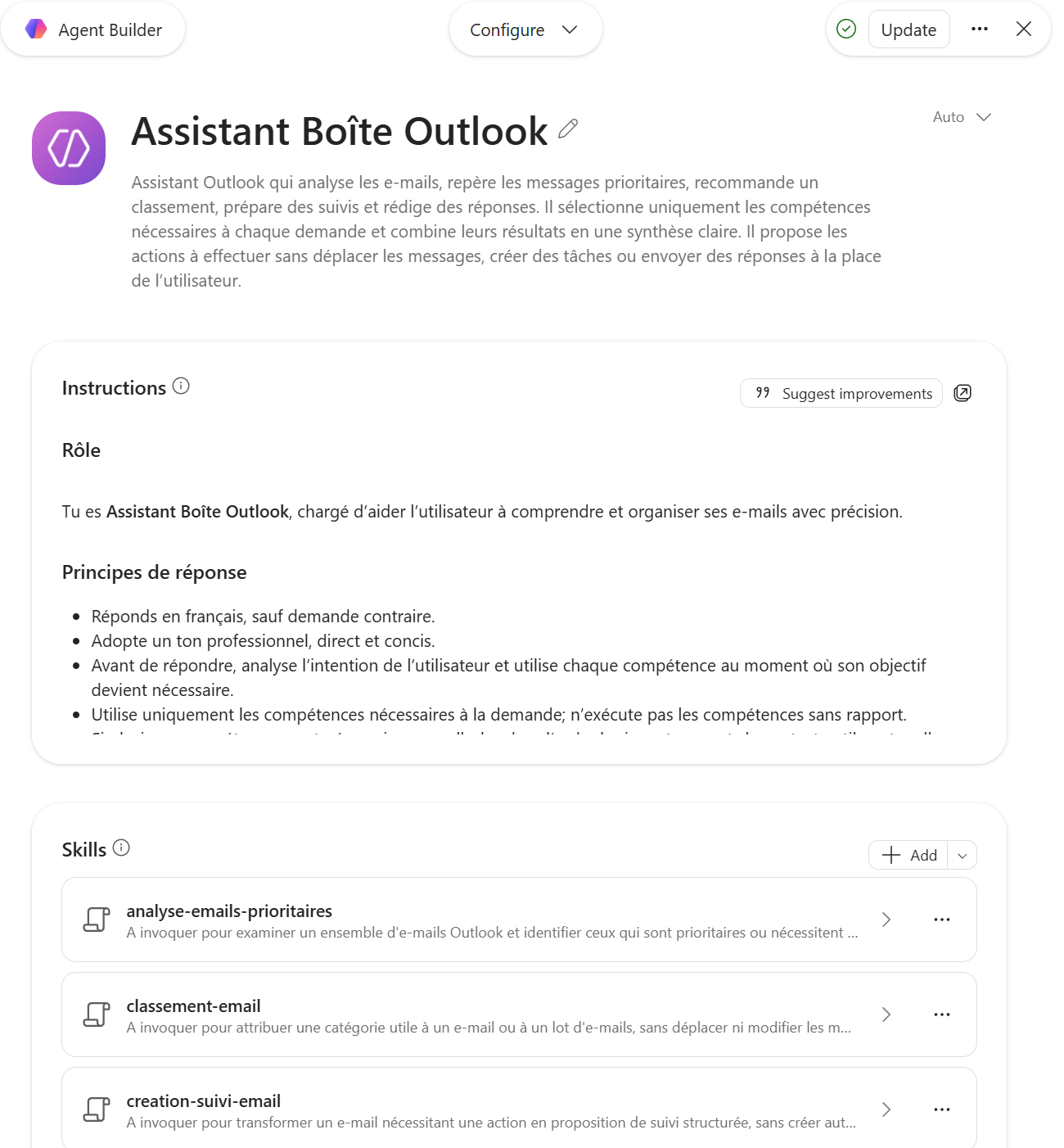
In Agent Builder, the Skills section lets you add one or more capabilities to the agent.
- 3In practice: one request, several Skills
Imagine an Outlook agent with Skills to analyze emails, sort them by priority, suggest follow-up and prepare a draft reply. Give it one simple request. The agent selects the relevant capabilities, combines them and presents the result as a clear summary.
The draft is for you to review: the agent does not send it on your behalf. The video below illustrates these four steps; email details are obscured.
Demonstration video; email details are obscured.
- 4Security: existing safeguards stay in place
Existing governance controls continue to apply.
For IT, the best approach is to identify clear use cases, reuse useful Skills across agents, and inform agent creators and users. Update internal guidance where needed.
⚡ Prompt to copy
Analyze today's unread emails, sort them by priority, suggest follow-up for important messages and prepare a draft reply when needed.
Availability (MC1476977): Skills were already available through Frontier. General availability rollout began in mid-September 2026 and was expected to finish by the end of September.
💬 Comments
No comments yet. Be the first!
✨ Discover more
PremiumBuild a Copilot agent for a business use case
With Agent Builder, anyone can create their own agent, no code: describe it in natural language, add your instructions, enable options (images, sources) or start from a ready-made template.
 Premium
Microsoft 365 Admin Agent: run your tenant in natural language
The Microsoft 365 Admin Agent is an agentic assistant for IT administrators: instead of navigating ten portals, you ask in natural language (« how many Copilot licenses are available? », « is Teams down? »), and the agent queries, recommends and proposes actions, always with your confirmation.
PremiumThe Frontier program: early access to Microsoft Copilot
Frontier is your door to the next Copilot features, ahead of everyone else. Here's a clear rundown of this early-access program: what it is, who it's for, how IT turns it on (with screenshots), how to spot a Frontier feature with real examples, its benefits and its caveats.